Introduction
For this week’s challenge, we’re exploring Sigma’s workbook actions, a powerful feature that enables better end-user experiences, nuanced data exploration, and more impactful presentations.
Sigma’s workbook actions cover a wide range of interactions, but for this first challenge, we’ll focus on two common action scenarios: clicking to filter and clicking to change.
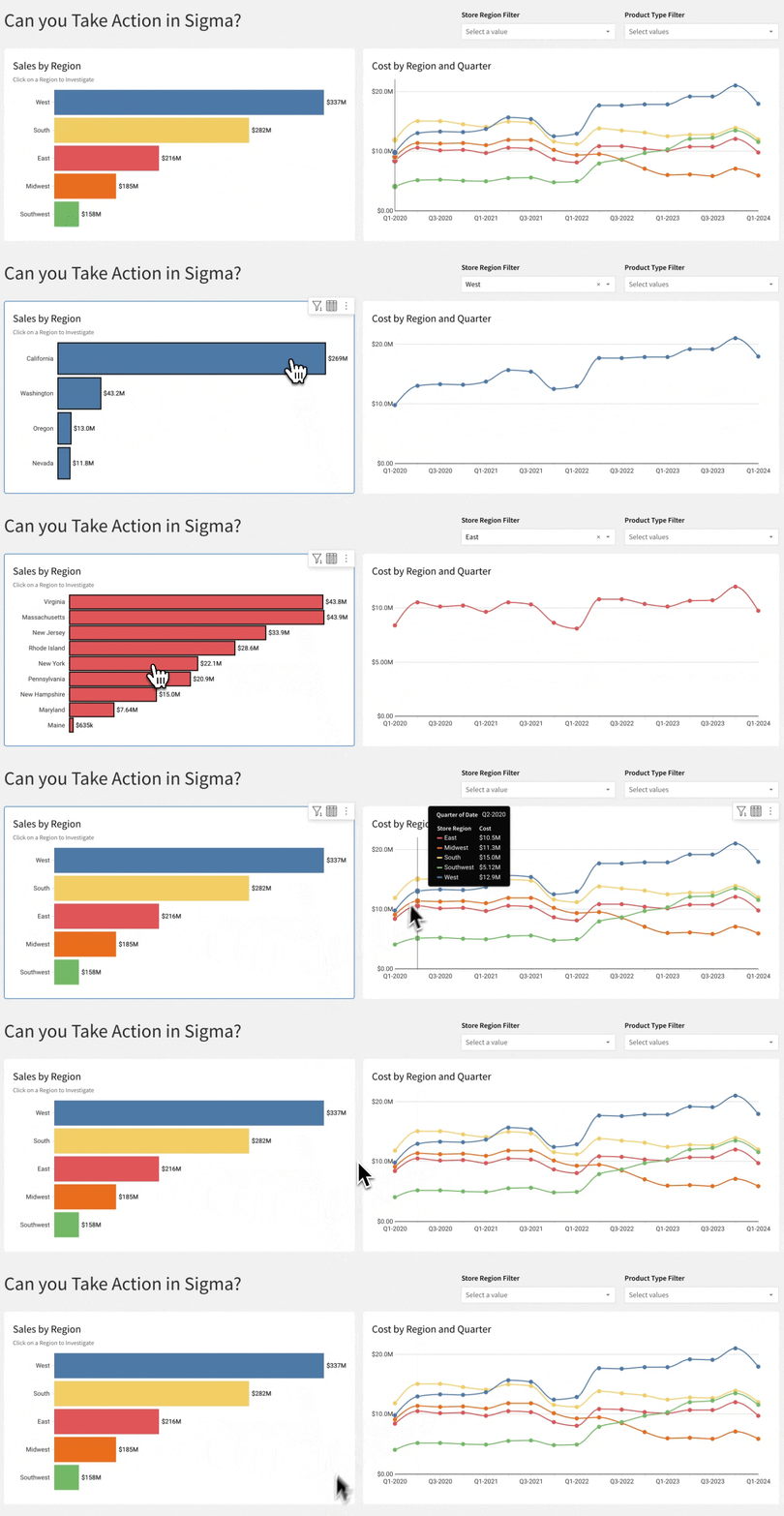
As you complete this challenge, note each element’s entire behavior, not just what is in the gif below. 🧐
Enough talk, let’s take action!
Need access to Sigma?
Note: You will only have view access to WOW Workbooks, Folders, and Workspaces, not edit access. Please create your WOW Workbooks under “My Documents.” We suggest creating a folder to organize all your workbooks.
Requirements
- Add a data element from PLUGS_ELECTRONICS_HANDS_ON_LAB_DATA
- Sigma Sample Database > Retail > Plugs_Electronics
- Rename Price to Sales and apply the custom format of $,.3s
- Create a Horizontal Display Bar chart showing Sales by Region
- Match title and subtitle
- Hide X-Axis Grid Lines
- Hide Legend
- Display all Data Labels
- Color by Region
- Hint: I suggest naming your color field something distinctive
- East #E15658
- Midwest #EB6E1E
- South #F1CE63
- Southwest #71B965
- West #4E79A7
- Create a Cost by Region and Quarter Line Chart
- Match title
- Format Quarter to Q%q-%Y
- Hide Legend
- Hide Data Labels
- Match line style: Smooth, solid, 2px, with Circle Style Points, 8px
- Color by Region
- East #E15658
- Midwest #EB6E1E
- South #F1CE63
- Southwest #71B965
- West #4E79A7
- Create a Store Region List Control Element
- Match Element Properties
- Create a Product Type List Control Element
- Match Element Properties and Functionality
- Create a Workbook Action that
- Filters the bar and line elements to the clicked on Region
- Changes the bar chart Y-Axis to the States within that Region
- Changes the bar chart Y-Axis back to all Regions when clicked again
- Hide Data Tab
- Add the Medium heading page title
Dataset
Sigma Sample Database > Retail > Plugs_Electronics > Hands_On_Lab_Data
Share
After you finish your workout, share on LinkedIn, Sigma’s Community page, (or Twitter) using the hashtags #WOW2024 and #SigmaComputing, and tag Ashley Bennett, Eric Heidbreder, and Katrina Menne!
Also, make sure to fill out the Submission Tracker so that we can count you as a participant this week to track our participation throughout the year.
Solution