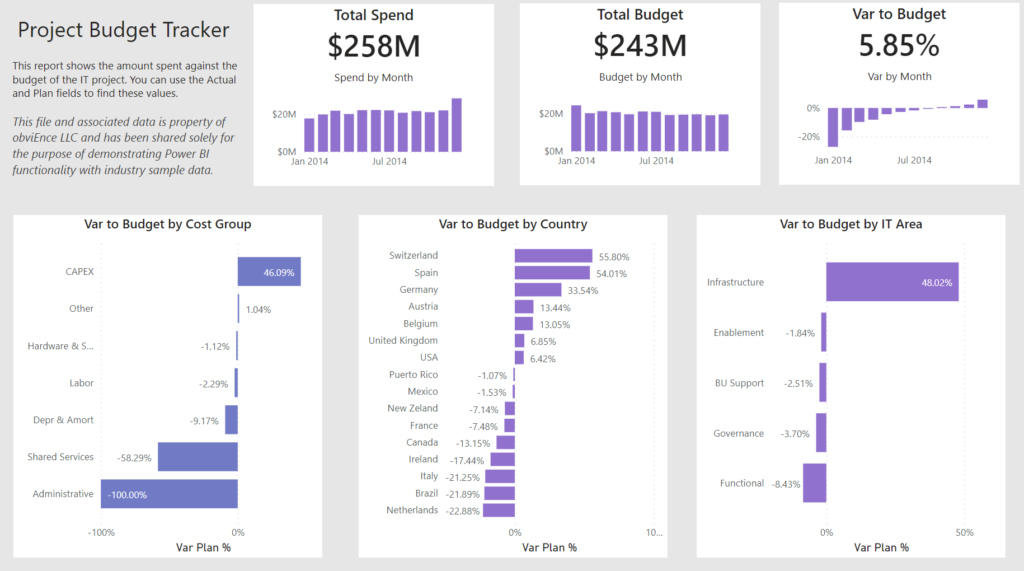
2021 Week 14 | Power BI: Accessibility Enhancements
Power BI Conditional Formatting using Background Color, Font Color, and Icons
2021 Week 14 | Power BI: Accessibility Enhancements Read More »
Power BI Conditional Formatting using Background Color, Font Color, and Icons
2021 Week 14 | Power BI: Accessibility Enhancements Read More »
Introduction Have you ever purchased something on Amazon and they show an extra random list of products in the “Customers that purchased X also purchased…” section and you think to yourself, “How in the world did they come up with that combination (e.g., sponges and Skittles)?” They likely have high-powered recommender engines doing all of
2021 Week 14 | Tableau: Can You Recommend Profitable Return Customer Bundles? Read More »
Introduction The goal is a modified mekko chart. My guess is you will need LODs to solve but it is 100% possible with table calculations. Click to open in Tableau Public Requirements Dashboard Size: 800px by 400 px Set the bar height to be percent profitable. The level of analysis should be at the sub-category
2021 Week 13 | Tableau: What percentage of sub-orders are profitable? Read More »
Power BI Conditional Formatting using Background Color, Font Color, and Icons
2021 Week 13 | Power BI: Create a Bubble Chart with a Custom Overlay Read More »
The Fixed LOD gets a lot of the spotlight in tableau but we shouldn’t forget about its cousins INCLUDE & EXCLUDE. Have a go at this challenge to practice use those functions.
Week 12: Can you do Comparative Quantity Analysis? Read More »
Introduction Thanks to everyone who has ben participating in #WorkoutWednesday – Power BI edition. This week we are going to be diving into a couple of different ways to custom sort your data. End users will often ask for specific sorting order, so figuring out how to do this in Power BI can be extremely
2021 Week 12 | Power BI: Custom Sorting Read More »
Power BI Conditional Formatting using Background Color, Font Color, and Icons
2021 Week 11 | Power BI: Can you Turn a Ribbon Chart into a Bump Chart? Read More »
Introduction This week I wanted to throw it back to an old classic chart by Hans Rosling, if you haven’t seen the TED talk I highly recommend watching it. Hans shows how fertility rate and life expectancy has changed over the years. With this example we are going to look at Income per GDP and
2021 Week 11 | Tableau : Can you recreate the work of Hans Rosling? Read More »
Introduction This week’s challenge is pulled directly from a work challenge I encountered recently. The ask was to build a filtering system that would allow the user to initially filter data and then add a secondary requirement of inclusion. Using the Superstore data set, the functionality we wanted to achieve was: Allow user to filter
2021 Week 10 | Tableau: Can you build a must include filter? Read More »
Introduction Thanks for joining us for Week 10 of Workout Wednesday – Power BI Edition. This week our challenge is to use the Violin Plot custom visual. There are no dependencies on prior weeks for this workout, so feel free to jump right in. Custom visuals are additional visuals created by Microsoft and Microsoft partners
2021 Week 10 | Power BI: Violin Plot Custom Visual Read More »