
Introduction
Hey all! Thank you so much for checking out the new Power BI edition of #WorkoutWednesday. Although the Tableau version of #WorkoutWednesday has been going on for several years, this is our first attempt at creating a similar community with Power BI. If you’re unfamiliar with the concept, we will release a challenge every week on Tuesday evening. The challenge will consist of a data set, a set of requirements, and eventually a solution video. The hope is that you will take the data set and fulfill all of the requirements in the blog post (such as you’re reading now). The goal is to highlight new techniques, common workarounds, and to generally expand your skillset. No need to delay any further, let’s hop right into it!
Requirements
- Because this is the first ever #WorkoutWednesday Power BI style, we are going to start simple. The first few challenges are going to build on one another, so keep this in mind as we start out the year.
- Create cleaned data set with only teams from the Football Bowl Division. In order to do this, in the FBS Conferences field exclude the FBA Totals and null values.
- Within NCAA Subdivision, remove all Conference Medians
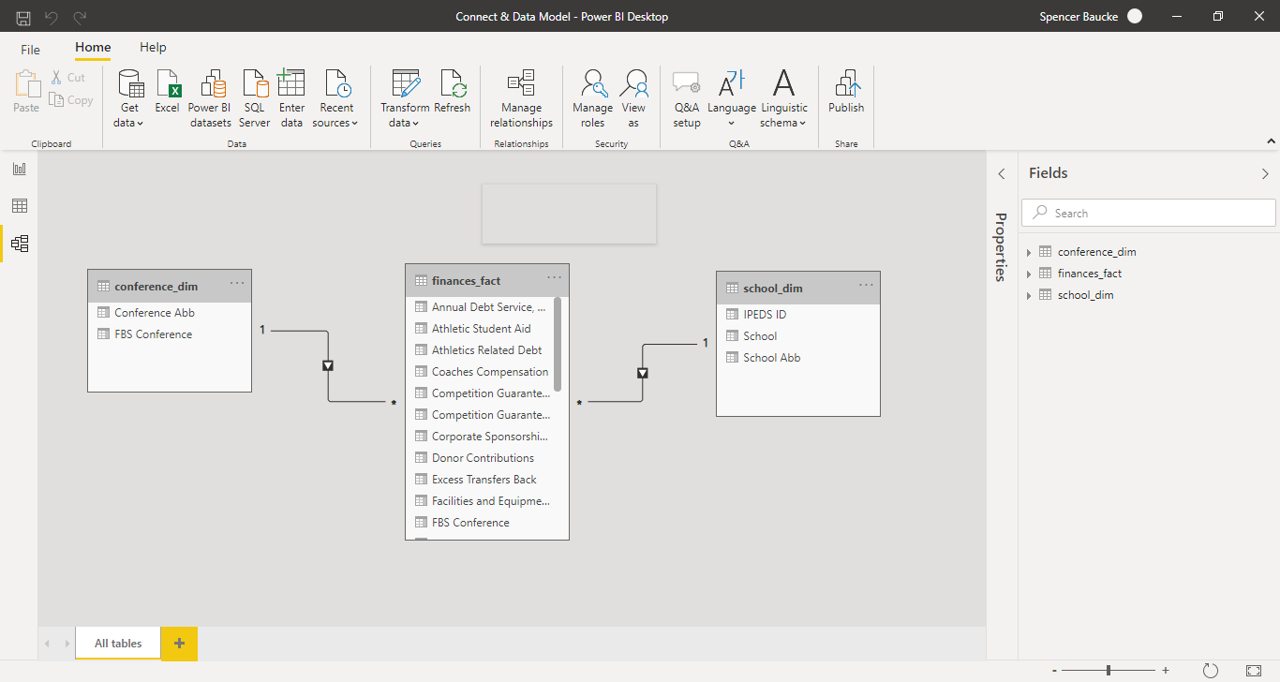
- Create data model properly relating two dim tables to the fact table.
- Try and use as least amount of steps as possible.
Dataset
This week uses a data set that breaks down NCAA athletic department expenses and revenues by year. You can get it here at data.world
Share
After you finish your workout, share on Twitter using the hashtags #WOW2021 and #PowerBI, and tag @JSBaucke, @MMarie, @shan_gsd and @dataveld. Also make sure to fill out the Submission Tracker so that we can count you as a participant this week in order to track our participation throughout the year.
Solution
*As an addition, remove Conference Median values from the NCAA Subdivisions